 Playout
Free money apps: what free means and how they pay you
Free money apps are apps that cost you nothing to use and pay you for something you do, like playing games, answering questions or shopping. The money is free in the sense that you never pay in; you earn it with your time, and with a game reward app like Playout that time is spent playing.
Key facts
- What free means
- No cost to you: nothing to buy, no subscription and no fee to cash out. You earn by playing or doing small tasks.
- Main kinds
- Game reward apps, survey apps, cashback apps, receipt apps, step apps and small-task apps.
- Most fun
- Game reward apps like Playout: every finished level in a free casual game adds coins.
- How you get paid
- Usually PayPal cash or gift cards. Playout pays both, from a low minimum.
- What to expect
- A fun bonus for spare time, not a second income.
Free money apps are one of the friendliest ways to earn a little extra from your phone. They cost you nothing to use, and they pay you for something you do anyway: playing a game in the evening, answering a few questions, shopping for groceries. The “free” part means you never pay in. You earn with your time, and the best apps make that time enjoyable.
Here’s what free really means, the main kinds of free money apps, and how a game reward app like Playout fits in.
What makes a money app free
A free money app costs you nothing at any step:
- Free to download from your app store.
- Free to use, with nothing you have to buy to start earning.
- Free to cash out, with no fee taken from your payout.
What you bring instead is your time and attention. You play, answer, scan or shop, and the app rewards you for it, usually as points or coins that turn into PayPal cash or gift cards. That’s the whole deal, and it’s a good one when the activity is something you enjoy.
The main kinds of free money apps
Each kind rewards a different part of your day:
- Game reward apps pay you for playing casual mobile games. You play as usual and your progress becomes money. This is where Playout fits.
- Survey apps reward you for sharing your opinion on products and habits.
- Cashback apps give you back part of what you spend at partner stores.
- Receipt apps reward you for scanning shopping receipts.
- Step apps turn your daily walking into points.
- Small-task apps pay for quick jobs like tagging photos or testing a feature.
Many people combine one app for downtime with one for errands. For a deeper comparison, see the best apps to make money and what a get-paid-to app is.
Playout: a free money app for people who like games
Playout is a free Android app that rewards you for playing a hand-picked shelf of casual games. It’s free from start to finish: there’s no premium tier, no unlocks and no entry fee, the games on the shelf are free to install, and there’s no fee to cash out.
Here’s how it works:
- Install Playout from Google Play. There’s no sign-up form; your account is tied to your phone.
- Pick a game from the shelf, such as Mahjong Smart, Block Bus! or Screw Blast!, and install it from Google Play.
- Finish levels. Every finished level adds coins, and every 4 hours your coins convert into real money in your balance.
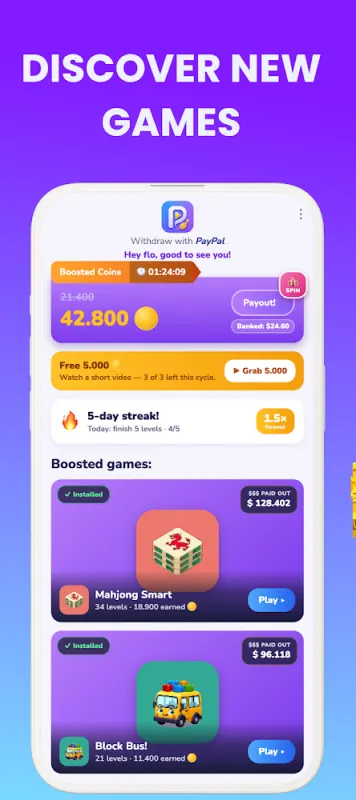
Because you earn by playing, the best game is simply one you enjoy. If you like logic puzzles, try Mines & Meows, and if you want something calm, Tile Tap! is played one tap at a time. See all games.
The free bonuses inside Playout
On top of your levels, Playout gives you plenty of free extras:
- A Welcome Reward of coins when you start, plus a one-time coin reward for picking your username. See the sign-up bonus.
- A daily streak. Finish 5 levels in any game each day and your streak grows, along with a coin boost on everything you earn. See the daily streak.
- Daily challenges that earn tickets toward a dice roll for bonus coins. See daily challenges.
- A weekly Live Event where finished levels earn items, and collecting enough wins a share of the prize pool as real money. See the Live Event.
- Monnies on the Passive tab, which fill a coin vault even while the app is closed. See Monnies and the vault.
- The daily quiz, the wheel and short surveys on the Home tab.
From free coins to real money
When your balance reaches the minimum, tap it at the top of the Home tab. Minimums are low, set per currency and shown in the app. You can choose:
- PayPal cash, the most flexible option, which you can spend or move to your bank.
- Gift cards like Amazon, Google Play, Steam or Spotify. The gift cards you can pick depend on your country, and the app shows the ones available to you.
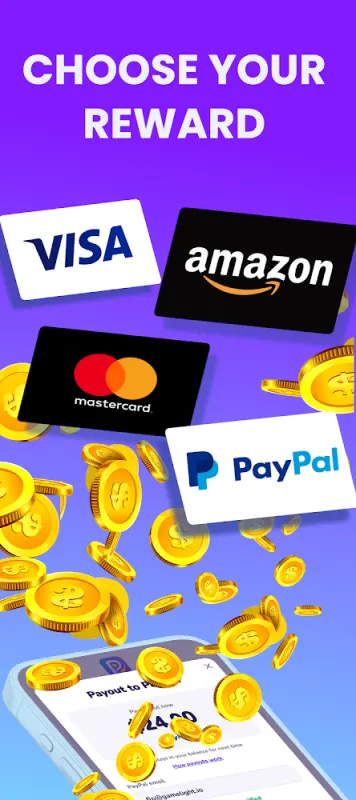
Payouts go out in round amounts, and anything above stays in your balance for next time, so nothing is lost. The reward email usually arrives within minutes. See how to cash out for each step.
How to pick a free money app you’ll stick with
A free money app pays off when you keep using it, so choose with that in mind:
- It rewards something you already enjoy. If you like casual games, a game reward app is the natural pick.
- The payout options suit you. PayPal cash and gift cards for stores you actually use.
- The minimum is low, so your first payout comes into reach quickly.
- Cashing out is free, so everything you earn reaches you.
- It runs on the phone you have. Playout is on Android today, available worldwide on Google Play.
- Support is easy to reach. With Playout, that’s the support chat in the app or support@playout.gg.
What to expect
Free money apps pay a little extra for your spare time. With Playout, what you earn grows with how many levels you finish, how regularly you play and the bonuses you collect. Think of it as gift-card money for time you’d spend playing anyway, not a second income. For more, read how much you can earn playing games.
Playout is available worldwide on Google Play for Android. Install it, pick a game you like, and let your playtime start paying.
PayPal, Amazon, Google Play, Steam and Spotify are trademarks of their respective owners. Playout is not affiliated with or endorsed by them.
