 Playout
Casual games that pay real money
Casual games that pay real money are the easiest way to earn with your phone. Playout rewards every level you finish in short, free games, and you cash out to PayPal or a gift card.
Key facts
- What you play
- Short, free casual games: tower smashers, parking puzzles, block and sort games.
- How you earn
- Coins for every finished level, converted into real money every four hours.
- Session length
- As short as you like. Most levels take a minute or two.
- Rewards
- PayPal cash, Amazon and Google Play gift cards.
- Cost
- Free to play and free to cash out.
Casual games that pay real money fit the moments you already have: a queue, a commute, a few minutes on the sofa. With Playout, the short, free games you’d play anyway earn coins on every level, and those coins turn into PayPal cash or gift cards. No long sessions, no learning curve and nothing to buy.
What makes a game casual
Casual games are built to be picked up instantly. You learn the rules in a few seconds, play with one thumb, and finish a level in a minute or two. When you put the phone down, nothing is lost: the next level is waiting whenever you come back.
That’s the opposite of a long, competitive game, and it’s exactly why casual games are so popular. They’re relaxing, they’re satisfying, and they fit around your day instead of taking it over.
Why casual games suit earning
Playout pays per finished level, so a game made of quick levels is a great match:
- Every short session counts. Three levels while the kettle boils still add coins.
- One-thumb play. Tap, hold or drag, so you can play standing on a train.
- Easy to start, easy to keep going. Quick levels make the 5-level daily streak a few minutes’ work.
- Plenty of variety. The shelf mixes reflex games, gentle puzzles and colorful sorters, so you can switch with your mood.
Casual games on the Playout shelf
Each of these is free on Google Play and earns coins for every finished level when you open it from Playout.
Crown Crush: one thumb, quick levels
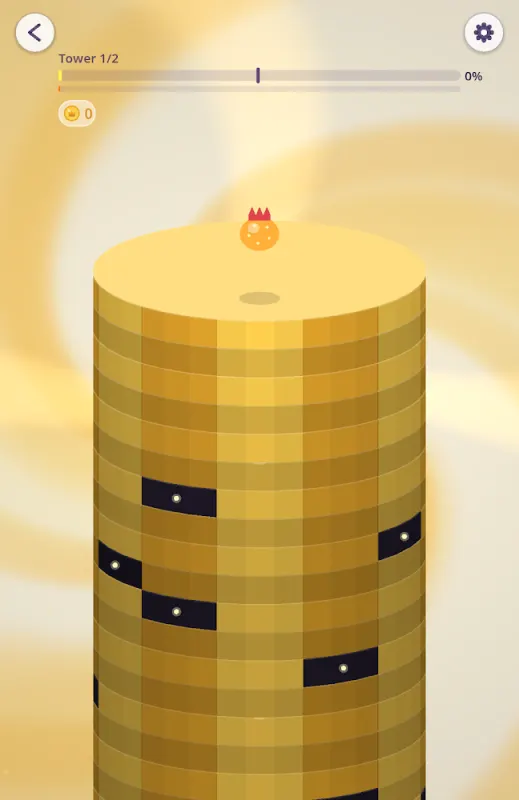
Crown Crush is the fastest game on the shelf. A crowned ball sits on a spinning tower: hold to smash down through the plates, let go when a dark section comes around. The levels are short, so a single bus stop is enough for a few of them.
Jelly Jam: one tap per move
Jelly Jam is a squishy parking puzzle. Tap a jelly car with a clear path and it wobbles out of the lot. Send three of the same color in a row and they fuse into a Jelly Truck that plows a whole lane. It’s bright, lively and learned in seconds.
Block Bus!: block puzzle at your pace
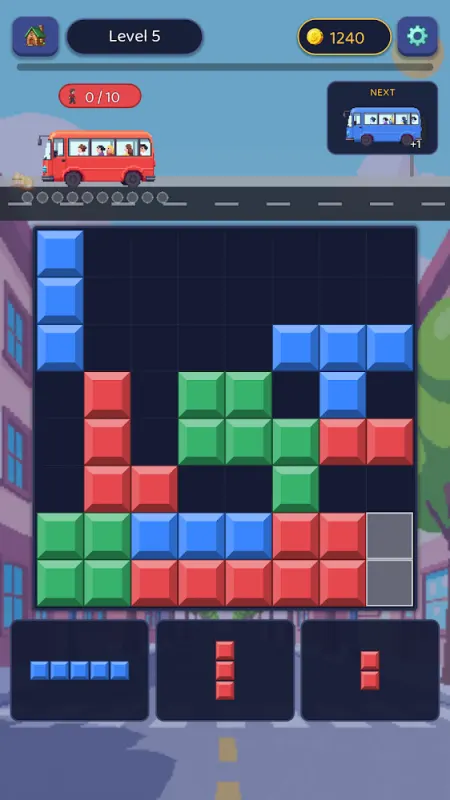
Block Bus! takes the familiar block puzzle and adds buses. Clear lines, and blocks in the waiting bus’s color board as passengers. Send every bus off and the level is done. There’s no timer, so you can think as long as you like.
Candy Cannon Sort: sorting with a cannon
Candy Cannon Sort turns ball sort into a flick-and-fire game. Fire candy into glass tubes, fill a tube with one color and it erupts, often setting off a chain. Most levels take under a minute, it plays offline, and there are no in-app purchases.
Tile Tap!: the gentlest start
Tile Tap! is a laid-back tile puzzle you play one tap at a time. It’s a lovely first game if you’re new to mobile games, and easy to stop and pick up again.
Arrow Survival: progress you can see
Arrow Survival is the strategy pick for casual players who like watching a build grow. Merge arrows into stronger forms, choose upgrades and push through stages one at a time.
Pick a game for your mood
The nice thing about a casual shelf is that there’s a game for every moment:
- A two-minute wait: Crown Crush or Tile Tap!, where a level is over almost as soon as it starts.
- A relaxed evening on the sofa: Block Bus!, with no timer and plenty of room to think.
- When you want a little spectacle: Jelly Jam’s trucks or Candy Cannon Sort’s chain eruptions.
- When you like long-term goals: Arrow Survival, where your build grows stage by stage.
Switching between them isn’t just fun, it’s rewarded: the daily event tiers count levels in any game, and the weekly Live Event pays the first item on each game for fewer levels than the next one on the same game.
How earning works
- Install Playout from Google Play. No sign-up form; your account lives on your phone.
- Pick a game from the shelf and install it from there, so your levels are linked to your account.
- Finish levels. Each one adds coins to your counter.
- Coins convert every four hours into real money in your balance, and the balance keeps stacking.
- Cash out from a low minimum, set per currency and shown in the app, as PayPal cash or a gift card. It usually arrives within minutes.
What to expect
Casual games that pay real money are a fun bonus for time you’d spend on your phone anyway, not a second income. Your balance grows with how much and how regularly you play, and the daily challenges and weekly Live Event add extra for mixing games. If you prefer slower, thinking games, our guide to puzzle games that pay real money has you covered.
