Playout
Earn money in retirement by playing games
Retirement is a great time to enjoy a good puzzle, and with Playout it pays a little too: play calm games like Mahjong solitaire on your Android phone or tablet, and every board you clear earns coins for PayPal cash or gift cards.
How it works, in three steps
Install Playout
Get it free from Google Play. There is no form to fill in and no password to remember: your account is tied to your device.
Choose a calm game
Start with Mahjong Smart or another relaxed puzzle from the Playout list. Install it free and play at your own pace.
Enjoy your rewards
Every 4 hours your coins turn into money in your balance. Cash out to PayPal or choose a gift card whenever you like.
No timers, no rush
Games like Mahjong Smart and Block Bus! have no clock. Take all the time you want.
Easy to read
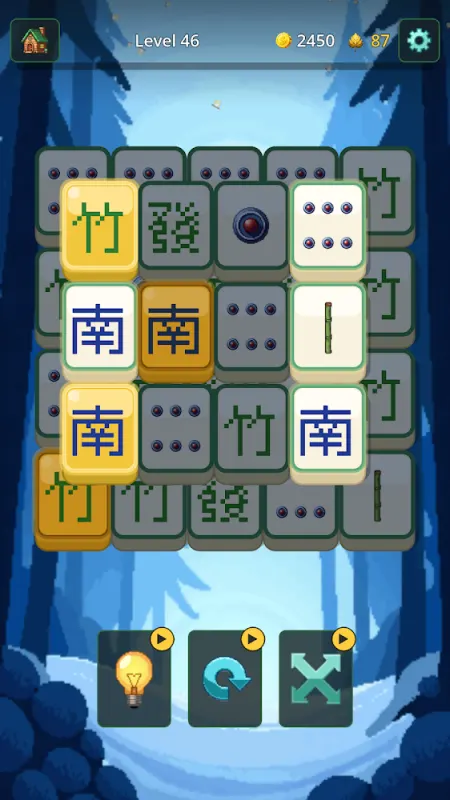
Mahjong Smart has large, readable tiles, plus hint, undo and shuffle buttons.
Nothing to remember
No sign-up form, no password, no login. Open the app and play.
Completely free
No purchases, no subscription, no entry fee. The games are free too.
A pleasant daily habit
Five levels a day keeps your streak going and grows a coin boost that stays.
Friendly help
Questions? Use the support chat in the app or email support@playout.gg.
Retirement brings time for the things you enjoy, and for many people that includes a good puzzle with a cup of tea. Playout lets you earn money in retirement from exactly that. You play calm, unhurried games on your Android phone or tablet, every board you finish adds coins, and the coins become PayPal cash or gift cards. It’s free, there’s nothing to buy, and there’s no password to keep track of.
Earning money in retirement, at your own pace
Playout asks nothing of your schedule. Play over breakfast, in the garden, or in the evening with the news on. Each level you finish adds coins, and every 4 hours Playout converts them into real money and banks it to your balance. The balance only grows, so a quiet week and a busy week both add up.
Getting started is simple. Install Playout from Google Play and open it. There’s no form to fill in and no email or password to set up, because your account is tied to your device. Claim your Welcome Reward, pick a game from the list and install it the same way you’d install any app.
Games that suit a relaxed day
The Playout shelf has a few games that are especially pleasant when you’d rather think than rush:
- Mahjong Smart is classic Mahjong solitaire. Match identical free tiles two at a time until the board is clear. There’s no timer, the tiles are large and easy to read, and hint, undo and shuffle are always there. Daily puzzles give you something to come back to.
- Mines & Meows is a cozy logic puzzle in the spirit of Minesweeper, with cats. Read the clues, rule out the wrong cells and clear the board, with no guessing needed.
- Block Bus! is a friendly block puzzle with no clock. Fill lines, send off the buses and take as long as you like over each move.
- Tile Tap! is the most laid-back game on the shelf: clear the board one tap at a time.
A small daily ritual that pays
Many players enjoy Playout as a daily habit, and the app rewards that. Finish 5 levels in any game each day and your streak grows by one. Every streak day raises a coin boost that applies to everything you earn, and the boost is permanent: if you take a day off, the boost you’ve earned stays. See the daily streak.
There are gentle extras too: a daily quiz on the Home tab, a fresh set of level goals on the Challenges tab, and Monnies on the Passive tab that fill a coin vault even while the app is closed.
Share it with family and friends
Playout is nice to share. Your username is your invite code. When a friend or family member installs Playout and enters it within 7 days, they start with 2× earnings for 48 hours, and you unlock rewards as they play. Add each other on the friendlist and you can send a free gift every day. See inviting friends.
Cashing out, step by step
When your balance reaches the minimum, tap it at the top of the Home tab. Minimums are low and shown in the app. For PayPal, type your PayPal email twice so there are no typos, then tap Request Payout. A reward email usually arrives within minutes; open it and accept the reward. You can also choose a gift card such as Amazon or Google Play.
If you ever have a question, the support chat in the app and support@playout.gg are there for you. Expect a fun bonus for time you enjoy anyway, and a good puzzle every day.
PayPal, Amazon and Google Play are trademarks of their respective owners. Playout is not affiliated with or endorsed by them.