Playout
Earn money as a stay-at-home parent
As a stay-at-home parent you can earn a little extra during nap time and school pickup: Playout rewards you for finishing levels in free, relaxed games, and your coins turn into PayPal cash or gift cards.
How it works, in three steps
Install Playout in a minute
Get it free from Google Play. No sign-up form, no password and no schedule to commit to.
Play in the quiet moments
Nap time, the school pickup line, the last stretch of the evening. Finish a few levels whenever the house goes quiet.
Treat the household
Every 4 hours your coins become money in your balance. Cash out to PayPal or pick a gift card for the things on your list.
Five minutes is enough
Many levels take under a minute, so even a short nap counts.
Games without a clock
Calm puzzles with no timer, so you never have to rush a move.
Earns while you're busy
Your Monnies fill a coin vault even while the app is closed.
No cost, no commitment
Nothing to buy and no shifts. Play on the days that suit you.
A small daily ritual
Five levels a day keeps your streak alive and grows a boost that stays.
Gift cards for home
Pick an Amazon or Google Play gift card, or take PayPal cash.
Days at home with kids rarely come with a free hour, but they’re full of small pauses: nap time, the pickup line, the moment after bedtime when the house finally goes quiet. Playout turns those pauses into something. You play relaxed casual games on your Android phone, every level you finish earns coins, and the coins turn into PayPal cash or gift cards. It’s a simple way to earn money as a stay-at-home parent with no schedule, no cost and no pressure.
How earning money fits a stay-at-home parent’s day
You don’t need to block out time. Open Playout, finish a level or two, and put the phone down when you’re needed. The coins you collected are already counted. Every 4 hours Playout converts them into real money and banks it to your balance, and that balance only grows. Busy days and quiet days both move it forward.
There’s no sign-up form either. Your account is tied to your phone, so there’s no password to forget, and you’re playing within moments of opening the app.
Games you can put down mid-level
Some games are better for interrupted days than others. These are the ones parents tend to love:
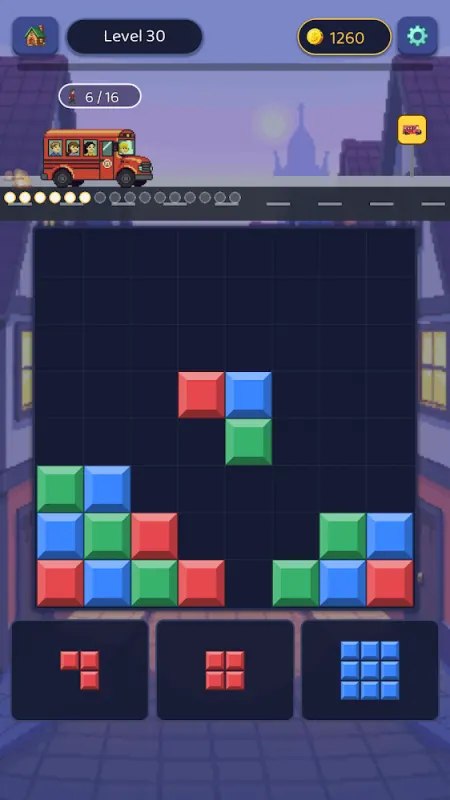
- Block Bus! is a block puzzle with no timer. There’s no clock, so you can stop and study the board for as long as you need.
- Mahjong Smart is calm Mahjong solitaire with no timers, large tiles and a hint button when you’re tired.
- Mines & Meows is a cozy logic puzzle with cats, made for slow, careful thinking.
- Hexa Pop and Candy Cannon Sort have most levels done in under a minute, perfect for a nap that might end any second.
Let the coins build while you’re busy
Two features keep working when you can’t play.
The Monnies on the Passive tab drop coins into a shared vault minute after minute, even while the app is closed. When you get a moment, wake any sleepy ones and tap Collect. A free daily pack brings new Monnies. See Monnies and the vault.
The daily streak rewards showing up rather than playing long. Finish 5 levels in any game each day, and every streak day raises a permanent coin boost. If a day gets away from you, a streak freeze can cover it, and the boost you’ve earned stays either way. See the daily streak.
The weekly Live Event suits uneven weeks, too. It runs for the whole week and settles on Monday, so a quiet Thursday can make up for a hectic Tuesday. And if you allow notifications, Playout lets you know when rewards and payouts are ready, so there’s no need to keep checking.
Turning playtime into something for the family
When your balance reaches the minimum, tap it on the Home tab. Minimums are low, set per currency and shown in the app. Choose PayPal cash, or pick a gift card: an Amazon gift card goes toward household things, and a Google Play gift card covers apps and games. The reward email usually arrives within minutes.
Other parents in your circle can join in too. Your username is your invite code: a friend who enters it within 7 days of installing starts with 2× earnings for 48 hours, and you unlock Friend Pass rewards as they play. Add each other on the friendlist and you can send a free gift every day.
What to expect
Playout is a fun bonus for the downtime you’d spend on your phone anyway, not a job. Play when it suits you, skip the days it doesn’t, and enjoy watching a little balance grow on the side.
PayPal, Amazon and Google Play are trademarks of their respective owners. Playout is not affiliated with or endorsed by them.